
Managing chemical compliance manually is risky, time-consuming, and error-prone. Facilities handling thousands of Safety Data Sheets (SDS) face challenges like outdated data, slow updates, and audit failures. Digital audit software solves these issues by centralizing SDS management, automating regulatory updates, and streamlining compliance processes. Tools like a chemical compliance checker provide instant insights into regulatory status. Companies using such tools report a 45% reduction in compliance documentation time and a 30% drop in batch deviations.
The stakes are high – OSHA fines for violations can exceed $156,000, while EPA penalties can reach $100 million. With the chemical management software market projected to grow from $1.5 billion in 2023 to $5.9 billion by 2033, adopting audit software is becoming a necessity for regulated industries. This guide explains how to select, implement, and maximize the use of chemical audit software to improve compliance and reduce risks.
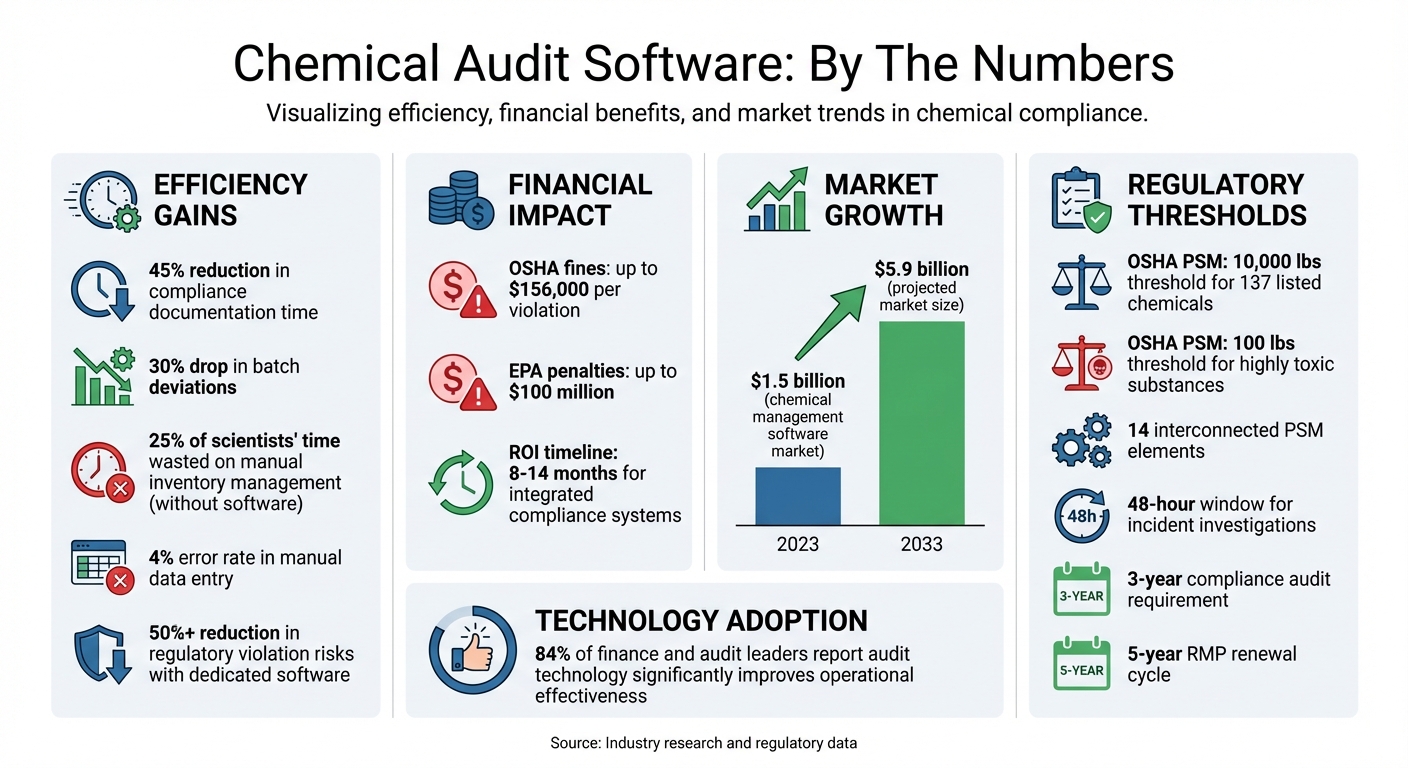
Chemical Audit Software Benefits and Compliance Statistics
EcoOnline Chemical Compliance Reporting
sbb-itb-aa4586a
Major Regulations for Chemical Audit Compliance
Chemical facilities in the United States must navigate a complex web of regulatory frameworks that demand meticulous documentation, regular inspections, and well-organized risk management systems. Key among these regulations are OSHA Process Safety Management (PSM), which focuses on preventing hazardous chemical releases through worker safety protocols, and the EPA Risk Management Program (RMP), which aims to protect communities by assessing offsite risks. While not U.S. mandates, ISO 9001 and ISO 14001 standards also play a critical role in ensuring quality and environmental management systems. Together, these requirements highlight the importance of using integrated audit software to efficiently manage compliance.
Manual systems often fall short when it comes to managing the complexity of overlapping regulations. Digital platforms simplify the process by centralizing chemical inventories, Process Safety Information (PSI), Process Hazard Analyses (PHA), and compliance audit schedules. They automate updates and generate audit-ready reports, making it easier to demonstrate compliance during inspections [7][8].
OSHA Process Safety Management (PSM)
OSHA’s Process Safety Management standard (29 CFR 1910.119) is designed to prevent catastrophic chemical releases. It applies to facilities handling 10,000 pounds or more of any of 137 listed hazardous chemicals. For highly toxic substances like phosgene or methyl hydrazine, the threshold is significantly lower – just 100 pounds [7][8]. The PSM framework is built around 14 interconnected elements, including employee participation, process hazard analysis, operating procedures, mechanical integrity, and management of change [7][8].
"For industries that handle hazardous chemicals… PSM is the line between safe operations and irreversible disaster. It’s not just compliance. It’s business survival." – Field1st [8]
Audit software simplifies PSM compliance by digitizing process safety information, automating Management of Change (MOC) workflows, and tracking mechanical integrity inspections for equipment like pressure vessels and relief systems. It also ensures timely incident investigations within the required 48-hour window and maintains comprehensive audit trails for the mandatory three-year compliance audits [7][8].
EPA Risk Management Program (RMP)
The EPA’s Risk Management Program (40 CFR Part 68) complements OSHA’s worker-focused PSM by addressing risks to surrounding communities and the environment. A key requirement is offsite consequence analysis, which evaluates the potential impact of chemical releases on nearby populations and ecosystems [6][7]. Facilities must assess public risks, coordinate with local emergency agencies, and submit detailed Risk Management Plans to the EPA [9].
Audit software supports RMP compliance by monitoring chemical inventories in real time and issuing alerts when quantities approach regulatory thresholds. It also automates documentation for the five-year RMP renewal cycle and streamlines emergency coordination protocols. Since PSM and RMP share many prevention program requirements, integrated software ensures that updates to process safety information are reflected across both programs, reducing duplication and enhancing efficiency [8][9].
ISO 9001 and ISO 14001 Standards
ISO 9001 outlines requirements for quality management systems, while ISO 14001 focuses on environmental management. Although these are international standards rather than U.S. regulations, they align well with PSM and RMP compliance efforts. ISO 9001 ensures consistent processes and thorough documentation, which are critical for maintaining operating procedures and training records required by PSM [9]. Meanwhile, ISO 14001 emphasizes environmental protection, including waste tracking and emissions monitoring, which align with EPA reporting standards.
Audit software integrates batch records, environmental data, and quality control documentation to meet both ISO standards and regulatory compliance needs. This eliminates redundant data entry and creates a unified source of truth for all compliance activities. For chemical distributors like Allan Chemical Corporation, which adheres to ISO 9001 and ISO 14001 standards, such software ensures traceability and documentation readiness for certification audits. By streamlining compliance across regulatory and certification frameworks, tailored audit software becomes an essential tool for chemical facilities.
This content is intended for informational purposes only. Always consult official regulations and qualified professionals for specific compliance guidance.
Core Features of Chemical Audit Software
Choosing the right chemical audit software means focusing on features that ensure compliance with OSHA, EPA, and ISO standards while addressing the inefficiencies of manual systems. The ideal platform should eliminate isolated data systems, automate regulatory updates, and provide instant access to essential safety information during inspections. Here’s a breakdown of the features that drive compliance and streamline audit processes.
Automated SDS Management is a key feature. Advanced software uses AI to extract critical data – like CAS numbers and hazard classifications – from Safety Data Sheets (SDS). It then cross-references this information with regulations such as OSHA and TSCA [3]. Automated updates ensure compliance with right-to-know laws and maintain a centralized, easily accessible SDS library for all facilities.
Regulatory Screening helps identify issues like incompatible chemical storage setups and calculates risk scores based on factors like toxicity and quantity [3].
Evidence and Audit Trail Management ensures that every document version, access log, and time-stamped action is securely stored. This creates a comprehensive history for auditors to review during inspections [1].
Storage Compatibility and Risk Scoring features proactively identify dangerous storage configurations, helping to prevent incidents and protect both workers and the surrounding community [3].
Customizable Audit Checklists
Pre-loaded regulatory frameworks can save time, but true flexibility comes from customizable audit checklists. Leading platforms allow users to adapt templates for specific needs, whether it’s a PSM compliance audit, an ISO 14001 review, or a tailored safety inspection for a particular facility [1]. These templates can be modified to include site-specific questions, adjust scoring, and create role-based checklists for different departments. Software that restricts customization can lead to incomplete audits, so it’s essential to choose tools that let you build on regulatory baselines while incorporating your own safety and operational protocols [1].
Real-Time Reporting and Analytics
Real-time dashboards provide immediate visibility into compliance gaps, enabling teams to take action before issues escalate [1]. Analytics tools can uncover trends in hazardous material usage and non-compliance, helping to improve training and refine safety strategies [5][11]. Instead of waiting for periodic reports, EHS leaders can monitor Maximum Allowable Quantity (MAQ) thresholds in real-time and receive alerts before limits are breached [11].
"By using such software, you receive real-time alerts when regulations change… and maintain audit-ready records." – Zoya Khan, VComply [1]
The ability to generate complex reports – such as Tier II, DHS CFATS, and fire code reports – instantly eliminates the need for manual data reconciliation during audits [10][11]. A report-forward database structure keeps data organized and ready for export into regulatory formats [10]. Multi-dimensional filters make it easy to answer urgent questions like, "Where are all our peroxide formers?" or "How much flammable solvent is stored in this building?" [10].
These tools ensure compliance with OSHA, EPA, and ISO standards, keeping your organization audit-ready across all regulatory frameworks.
Mobile Access and Cloud Integration
Mobile access is essential for field teams conducting audits in remote areas or facilities with limited connectivity [1][3]. Mobile apps allow users to scan barcodes or QR codes, retrieve SDS on-site, and verify chemical locations, even in challenging environments [2][5]. Features like barcode, RFID, and photo-based data capture link chemicals directly to their SDS and hazard information, reducing manual entry errors [11].
Cloud integration ensures secure, centralized storage of audit trails and evidence, making records instantly accessible for inspections [1]. For auditors working in areas with poor connectivity – like basements or remote storage sites – offline capabilities are a must [1].
This content is for informational purposes only. Always consult official regulations and qualified professionals for compliance and safety decisions.
How to Select the Right Audit Software
Choosing the right audit software is essential for ensuring compliance and operational efficiency. With the global chemical management software market expected to grow from $1.5 billion in 2023 to about $5.9 billion by 2033, it’s clear that compliance challenges are becoming more complex [3]. Regulatory penalties in the EHS sector can reach tens of thousands of dollars per violation, per day, making it crucial to invest in a platform that aligns with your organization’s needs [3]. To make the right choice, prioritize software features that directly address your compliance requirements.
Match Features to Compliance Needs
Start by identifying your specific regulatory obligations, such as OSHA PSM, EPA RMP, or other regional standards, and ensure the software meets these requirements. Look for platforms with robust regulatory screening tools that provide real-time alerts for global and regional compliance lists like REACH (Substances of Very High Concern), TSCA, OSHA HazCom, and WHMIS [3]. Advanced features such as AI-driven SDS authoring, which references a global database of over 300,000 substances, can help streamline compliance workflows [3][12].
Key deadlines, like the January 19, 2026 requirement for updating SDSs and labels under HazCom 2024, highlight the importance of automated regulatory updates [12]. Software that generates Digital Product Passports (DPP) with QR codes – offering instant access to recycled content, disposal instructions, and SVHC levels – can also support compliance efforts. Before implementing new software, schedule a thorough inventory audit to ensure all uploaded data is clean and accurate [2]. Additionally, verify that the platform integrates smoothly with your existing systems to avoid disruptions.
Check Integration and Scalability
Integration capabilities are critical. The software should connect seamlessly with your ERP, QMS, and lab management systems via documented APIs to avoid data silos [1][3]. Maintaining unified data standards across multiple locations ensures consistency as your organization grows. Configurable permissions for different teams or sites are also important to maintain security during expansion [11].
Cloud-based SaaS solutions are particularly useful, as they allow for scaling users and facilities without hefty upfront hardware costs [3][1]. To ensure the platform meets your needs, pilot it in a single department to test workflows and performance before rolling it out company-wide [3][1]. Multi-site dashboards that accommodate both local and global regulatory standards are essential for large-scale operations [13][1]. For field teams, mobile access and offline functionality can be invaluable, enabling workers to scan barcodes or QR codes and retrieve SDS information even in remote or challenging environments [13][1].
Review Cost and Vendor Support
When evaluating software, consider the total cost of ownership (TCO), including licensing, implementation, training, maintenance, support, and customization. For example, VComply’s Pro GRC Suite starts at $1,000 per month, while SafetyCulture’s Premium plan costs $24 per seat per month (billed annually) [1][5]. Enterprise providers like VelocityEHS, Cority, and Sphera typically offer custom pricing based on user count and specific needs [1][5].
"The cheapest option up front may cost the most over time." – Zoya Khan, Lead of Product Management and Operations, VComply [1]
Choose vendors with expertise in chemical management and GRC (governance, risk, and compliance) to ensure you receive tailored regulatory guidance and thorough onboarding [1]. Take advantage of demos and free trials to assess user adoption before committing [1][5]. Ensure the vendor offers proactive regulatory intelligence, support for closing compliance gaps, and regular software updates to keep your organization audit-ready with minimal manual effort [1][14].
This content is for informational purposes only. Consult official regulations and qualified professionals before making sourcing or formulation decisions.
How to Implement Audit Software
Implementing chemical audit software requires careful planning to reduce regulatory risks and improve operational efficiency. A systematic approach ensures you get the most out of your software investment while minimizing potential challenges.
Plan and Define Objectives
Start by identifying the physical areas involved, such as labs, mechanical rooms, or outdoor storage sheds, and the regulatory frameworks applicable to your operations, like OSHA PSM or EPA RMP [2][15]. Bring in representatives from key departments – EHS, IT, Procurement, and Operations – early in the process. Their input helps ensure the system addresses cross-departmental needs and secures the necessary resources [2][3]. Set measurable goals, such as improving audit readiness, reducing compliance risks, or automating SDS updates, to track the success of your implementation [16][1].
Before migrating data into the system, conduct a thorough inventory audit. This step allows you to remove unused chemicals, verify the accuracy of existing data, and refine workflows by piloting the system in one department before rolling it out across the organization [3][1][2][16]. With clear goals and accurate data in place, the next step is to prepare your team with proper training and clearly defined roles.
Train Teams and Set User Roles
To protect data integrity and security, establish role-based access control (RBAC) during the planning phase. Assign specific permissions based on responsibilities, such as who can view, add, or modify inventory data [1][3][13]. Appoint a lead for each area to oversee data collection and ensure audit accuracy [2].
Provide training tailored to each role. For instance, lab technicians might learn to scan QR codes for instant SDS access, while managers focus on generating compliance reports [3][13]. Use training sessions to highlight practical benefits, such as how mobile devices can retrieve safety data in seconds compared to the 15–20 minutes typically needed for manual SDS retrieval [3]. Take advantage of vendor-provided onboarding and training resources to streamline this process [13]. Once roles are established and training is complete, ongoing monitoring becomes essential to maintain compliance and improve efficiency.
Monitor Usage and Optimize Workflows
With well-defined objectives and a trained team, use centralized dashboards to monitor compliance gaps, audit progress, and risk assessments across all facilities [1][5]. Set up automated alerts for regulatory deadlines and document expirations to avoid missing critical compliance requirements [1]. According to industry data, 84% of finance and audit leaders report that audit technology significantly improves operational effectiveness [17].
Analyze the data collected by the software to identify recurring compliance issues and develop targeted corrective actions [5]. Regularly review how your current processes align with the software’s capabilities, and adjust workflows to eliminate inefficiencies [1]. Integrate the audit software with ERP, EHS, and lab management systems using APIs to ensure consistent data flow and prevent information silos [1]. Perform routine inventory audits rather than one-time cleanups to keep your data accurate and reliable [2].
This content is for informational purposes only. Consult official regulations and qualified professionals before making sourcing or formulation decisions.
Best Practices for Using Software in Chemical Distribution Audits
Once your audit software is up and running, along with a well-trained team, keeping it efficient requires ongoing attention. Even the most advanced platforms need regular monitoring. The following practices can help maintain compliance and streamline operations.
Keep Audit Templates Updated
Updating audit templates regularly is essential to closing compliance gaps. Modern software often tracks updates from organizations like OSHA, GHS, REACH, and TSCA, automatically integrating these changes into your system to keep templates aligned with the latest hazard classifications [18][19]. Automated alerts can notify you of regulatory updates, document expirations, or newly restricted substances [1]. AI-driven tools further enhance this process by continuously updating templates with current hazard data [19].
A centralized digital library ensures all facilities use the same templates, preventing inconsistencies across departments [2][18]. This approach supports uniform compliance, avoiding the risks associated with outdated templates. It’s particularly important given that OSHA frequently cites hazard communication violations among the top 10 most common infractions [18].
"Inaccurate SDSs can lead to improper PPE usage, missed exposure risks, or delayed emergency response, all of which raise the likelihood of worker injury." – HSI [18]
Use Automation Features
Manual data entry in chemical tracking is prone to errors, with rates reaching up to 4% [19]. Centralizing data through automation reduces these mistakes and allows teams to focus on higher-value tasks [1][13]. Features like mobile scanning offer instant access to SDSs, while automated cross-referencing ensures your chemical inventory stays aligned with global regulatory requirements [20][13].
Digital approval workflows for new chemicals can also streamline safety and risk assessments before procurement [1][13]. Using dedicated chemical management tools has been shown to lower regulatory violation risks by over 50% [19]. However, it’s important to periodically review these automated systems to ensure they adapt to your organization’s evolving needs.
"The fundamental issue is that spreadsheets are passive records, not active safety tools. They might tell you what you thought you had last month, but they can’t alert you to a dangerous storage conflict happening right now." – NextSDS [19]
Review Software Performance Regularly
The effectiveness of your software hinges on accurate data. Conduct regular physical audits to optimize your chemical inventory to verify that digital records match actual stock levels [2]. Review and adjust digital workflows periodically to ensure they align with both operational processes and compliance requirements [1].
It’s also crucial to check that APIs and connectors with ERP or EHS systems are functioning properly to avoid data silos [1][19]. Real-time dashboards can help identify non-compliance trends and highlight areas where adjustments may be needed [5][1]. As your organization grows – whether by adding facilities or increasing chemical volumes – evaluate whether the software remains effective [1]. Without these checks, manual inventory management could waste up to 25% of scientists’ time [19], underscoring the importance of regular performance reviews.
This content is for informational purposes only. Consult official regulations and qualified professionals before making sourcing or formulation decisions.
Integrating Software with ISO 9001 and ISO 14001 Systems
For chemical distribution operations, using audit software to integrate ISO 9001 and ISO 14001 systems is an effective way to centralize documentation and maintain compliance. These standards share a common High Level Structure (HLS), which allows them to be managed on a single platform [23]. This setup consolidates critical documents such as Safety Data Sheets (SDS), Standard Operating Procedures (SOPs), environmental impact assessments, and quality objectives. Features like version control and automated approval workflows ensure teams always access the latest documents during certification audits.
Audit software configured for ISO standards can automate Corrective and Preventive Action (CAPA) workflows. For instance, it logs nonconformances – like improper chemical storage or batch purity issues – assigns root-cause analysis tasks, and tracks their resolution [21]. The software also supports ISO 9001:7.6 requirements by scheduling equipment calibration and preventive maintenance, linking results directly to production quality records.
For ISO 14001, tracking environmental performance becomes more efficient with tools that monitor indicators such as waste output, emissions, and energy consumption. Digital logs for discharge data and emissions simplify regulatory reporting and provide management with real-time dashboards. By tracking quality metrics like batch purity and process consistency alongside operational workflows, companies gain full visibility into both quality and environmental performance. Automated tools for training, certification management, and audit trails with e-signatures keep staff aligned with ISO protocols while generating time-stamped evidence required for audits.
"Think of QT9 as your digital lab notebook + quality audit assistant wrapped into one system – always ready for inspection, never forgetting a detail." – QT9 Software [22]
This integration not only streamlines regulatory audit preparation but also supports continuous improvement in operations.
Before implementing such systems, conduct a thorough chemical inventory audit [2] to ensure accurate and complete data. Standardizing chemical names and hazard classifications minimizes duplicate entries and reduces system clutter. Linking safety procedures directly to operational workflows ensures ISO 14001 compliance during daily activities, while automated review cycles reinforce ongoing improvements.
Using Allan Chemical Corporation’s ISO 9001 and ISO 14001 systems provides a consistent framework for internal audits and certification processes. This foundation helps organizations align their audit software with internationally recognized standards.
This content is for informational purposes only. Consult official regulations and qualified professionals before making sourcing or formulation decisions.
Wrapping Up
Choosing the right chemical audit compliance software means matching its features to your specific regulatory needs, such as OSHA HazCom 2024 or REACH. The best platforms combine Safety Data Sheets, hazard labels, and inventory tracking into one streamlined system, minimizing manual data entry errors, which can average around 4% [19]. Before implementation, conduct a thorough chemical inventory audit to ensure your data is reliable. As HSI notes:
"What good is the best software if the data it manages isn’t accurate? …when it comes to chemicals in the workplace, that data is only as good as your last inventory audit" [2].
This accurate data serves as the backbone for a successful phased implementation.
Rolling out the software in stages allows for smoother integration. Start by setting clear goals, assigning specific user roles, and testing the system on a smaller scale. Features like mobile access and cloud integration ensure real-time updates and immediate access to safety data, enhancing overall efficiency.
Companies adopting integrated compliance systems often see a return on investment within 8 to 14 months while cutting compliance documentation time by 45% [4]. Regularly update audit templates to align with changing regulations, use automation to flag purchases against global watchlists, and periodically review software performance to address workflow inefficiencies. Implementing the right software can lower the risk of regulatory violations by over 50% [19], transforming compliance from a reactive task into a proactive approach.
For chemical distributors, combining audit software with established quality and environmental management practices creates a cohesive platform for documentation, CAPA workflows, and regulatory reporting. This integration not only strengthens compliance but also simplifies operations across the entire distribution process.
This content is provided for informational purposes only. Always consult official regulations and qualified experts before making sourcing or formulation decisions.
FAQs
How do I know if my facility is covered under OSHA PSM or EPA RMP?
Facilities that manage highly hazardous chemicals in amounts exceeding certain thresholds might be subject to OSHA’s Process Safety Management (PSM) standards or the EPA’s Risk Management Plan (RMP) requirements. To determine compliance, carefully evaluate the types and quantities of chemicals onsite. Compare them against the thresholds specified in OSHA’s 29 CFR 1910.119 or the EPA’s 40 CFR Part 68. If you’re uncertain about your facility’s status, it’s wise to consult the regulations directly or seek advice from a qualified safety professional.
What data should we clean up before migrating SDS and inventory into audit software?
Before moving SDS (Safety Data Sheets) and inventory data into audit software, there are a few key steps to take:
- Refresh SDS files: Get rid of outdated versions, label documents correctly, and organize them for quick access.
- Confirm inventory details: Double-check quantities, storage locations, and hazard classifications for accuracy.
- Resolve discrepancies: Eliminate duplicate entries and correct any naming inconsistencies.
- Connect SDS with inventory: Make sure every chemical is linked to its up-to-date safety data sheet.
These steps will help ensure a smooth and accurate migration process.
Which integrations are most important for chemical audit compliance software?
Key integrations for chemical audit compliance software focus on inventory management, regulatory updates, and Safety Data Sheet (SDS) management. These integrations ensure information stays accurate and current while simplifying compliance workflows.
For instance, linking with inventory systems allows for precise tracking of chemicals, ensuring accurate records. Connections to regulatory databases help automate alerts for new or changing requirements, keeping you informed without extra effort. SDS tools, combined with features like barcode scanning, make accessing critical information faster and more reliable. This reduces manual errors and boosts efficiency, making audit preparation much smoother.


Comments are closed